Guide
Free Mexicano padel app: create a tournament, draw rounds and enter scores
By Padelpoolen. Published .
Mexicano is great fun to play and a hassle to organise. After every round the standings must be recalculated and new teams formed, and that is where paper and spreadsheets tend to break down. In this guide we use real screenshots from a tournament we played in Norrköping to show how to create a Mexicano for free in Padelpoolen, how to draw each new round with one tap and how quick it is to enter the scores.
New to the format? Start with Mexicano padel explained: rules and scoring.
Why Mexicano needs an app more than Americano
In Americano the whole schedule can be fixed before the first ball. Everyone knows from the start who they will partner in round three. Mexicano works differently: each round is decided by the standings after the previous one. The leader plays with fourth place against second and third, and so on down the courts. Nobody can write the schedule in advance.
That means the organiser has to total every score, sort the table and pair new teams between rounds while eight, twelve or sixteen players wait. One adding mistake in round two follows you for the rest of the evening. An app that handles the totals and the draw removes exactly that step, so the organiser gets to play instead of holding a pen.
What does it cost? Nothing
Creating and playing Mexicano in Padelpoolen is free. You need an account, but no payment or subscription to organise a tournament, enter scores or view the table. Players do not need to download anything from the App Store or Google Play either. Padelpoolen runs in the browser and can be added to the home screen so it opens like a regular app.
That makes it easy to get everyone on board. Post one link in the group chat and whoever taps it sees the tournament, the time and the venue straight away.
Step 1: Choose Mexicano under Create
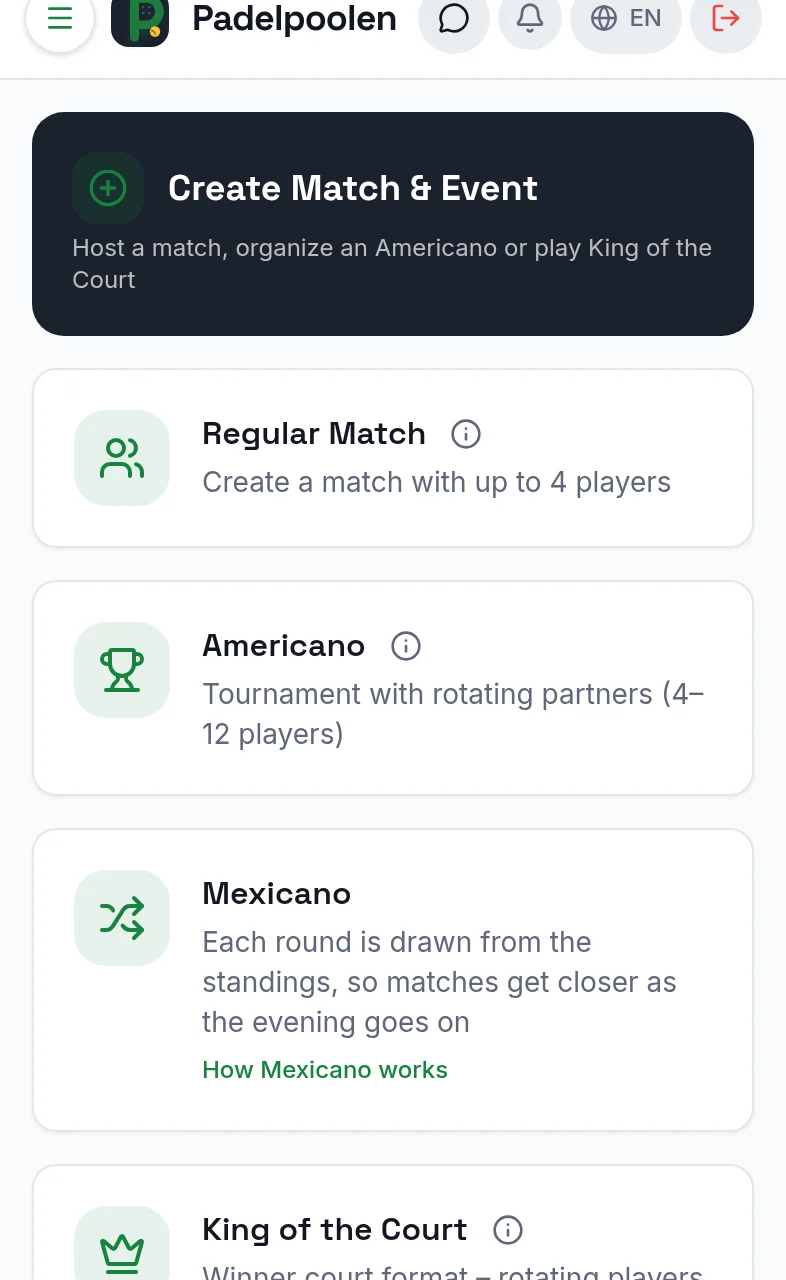
Tap Create in the bottom menu. You can choose between a regular match, Americano, Mexicano and King of the Court. Mexicano has its own icon with two crossing arrows, because the teams are reshuffled after every round. The card also links to our rules guide if you want a refresher before you start.
Step 2: Fill in the basics in under a minute
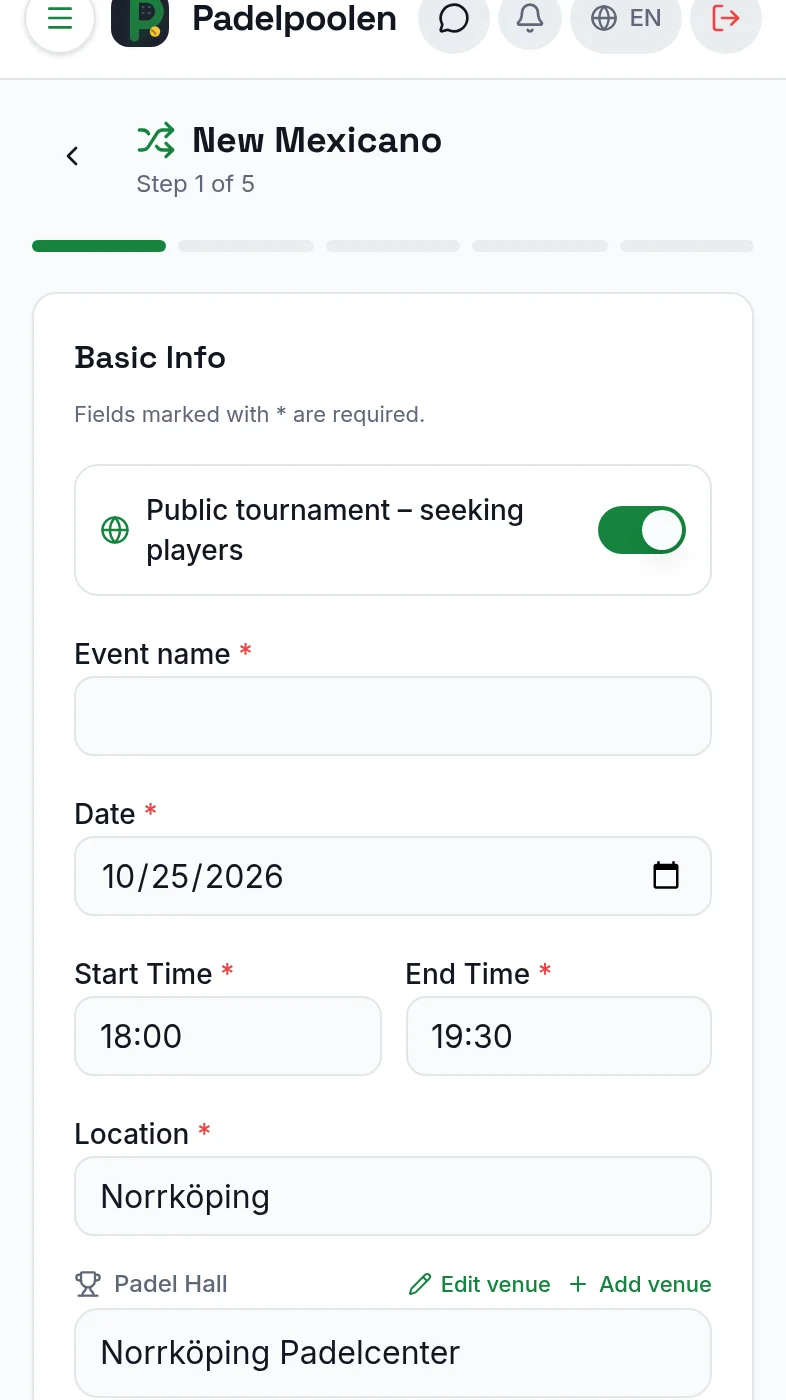
The form is split into five short steps, so it never feels cluttered on a small screen. In the first step you enter the event name, date, start and end time and city. Pick a saved padel venue and the address fills itself in, and players get a link to the map.
This is also where you decide whether the tournament is public or private. A public Mexicano appears in the match feed for nearby players, which is ideal when you are a couple of players short. A private one is only visible to the people you invite.
- Basics: name, date, time, city and venue.
- Number of players: 8, 12 or 16, which means 2, 3 or 4 courts.
- Points per match: for example 24 or 32 points in total.
- Level and category: a recommended level from 1 to 10 plus men, women, mixed or open.
- Players: choose padel friends, type in guests or leave spots open.
Step 3: Invite the players
There are three ways to invite people, and you can mix them. Pick padel friends from your friends list, type in names of guests without an account, or leave spots open so other players can tap Join in the match feed. Once the tournament is created you can share the link by WhatsApp, text message or a simple copy.
Guests without an account appear in the table just like everyone else. Handy when the regular group brings along a colleague who only wants to give it a try.
Round 1 is ready immediately
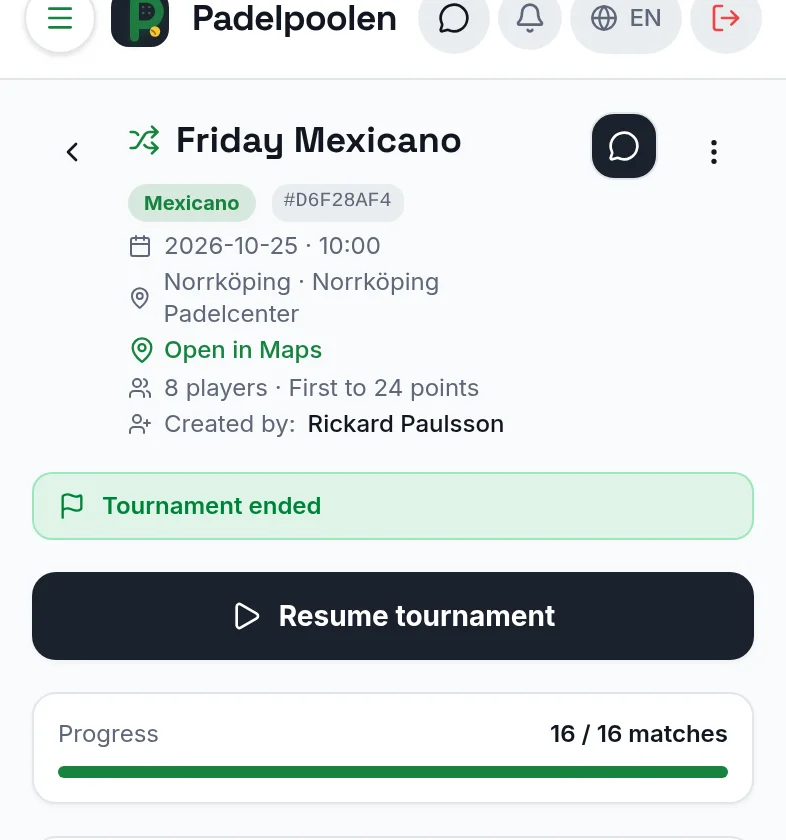
As soon as you tap Create, the first round is drawn. Every player can see which court to go to and who their partner is. The top of the tournament shows the name, date, venue, a map link, the number of players and the scoring format, so nobody needs to ask where to be.
Each tournament also has its own group chat, useful for checking that everyone has found the right venue or letting people know someone is running late.
Entering scores takes seconds
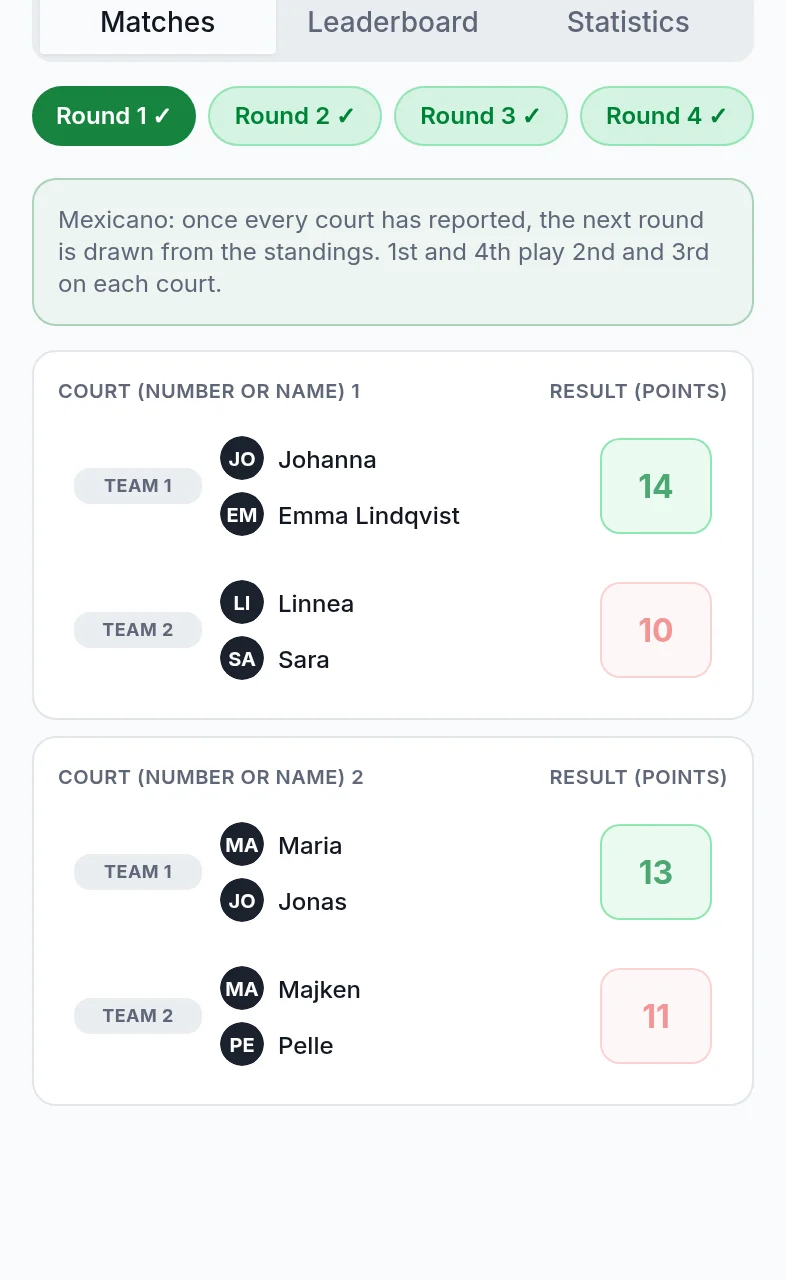
Each court has its own card with the two teams and one score box per team. After the match you simply type how many points each team won, for example 14 to 10. The winning team turns green and the losing team red, so any mistake is obvious at a glance.
Nobody has to do any arithmetic. The app adds 14 points to both players in the winning team and 10 to both players in the other. That is exactly how Mexicano should be scored, and it is also the step where handwritten lists most often go wrong.
At the top you will also see your tournament ELO and each team's average rating. It is the same rating used for Americano, because both formats are played on points with rotating partners.
Draw the next round with one tap
When every court has reported its score, a Draw next round button appears for the tournament creator. One tap is all it takes. The app sorts the standings and forms new teams using the core Mexicano rule: first and fourth play second and third on court 1, fifth and eighth play sixth and seventh on court 2, and so on.
If the number of players does not divide evenly across the courts, someone sits out a round. The app picks players from the bottom of the table, but nobody sits out a second time until everyone else has. That rule is hard to track by hand, and the app handles it for you.
Each new round gets its own tab, so you can always go back and check an earlier result.
The table updates while you play
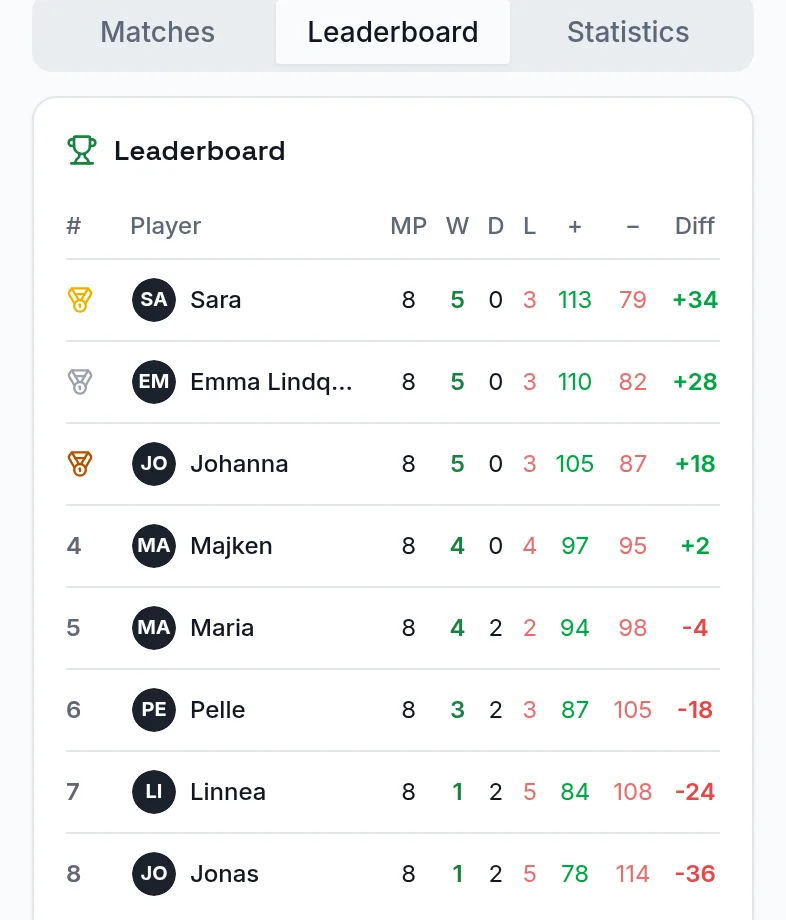
Under the Leaderboard tab every player sees the standings live: matches played, wins, draws, losses, points won and lost, and the points difference. The top three get gold, silver and bronze. In our Norrköping tournament Sara won with plus 34 ahead of Emma and Johanna, even though all three had five wins. A good example of why Mexicano counts points rather than just victories.
Your stats are saved afterwards
Once the tournament is finished it moves to the Completed tab under My matches. On your profile under Statistics and Tournaments you can switch between Americano and Mexicano to see your wins, points, podium finishes and recent tournaments. Tap any tournament to see the full final table and every round's results.
That makes it fun to play again and again. You can see whether you are climbing the table from one evening to the next, and your tournament ELO updates after every match.
Tips for a smooth first Mexicano
Start with 8 players on two courts and 24 points per match. That gives four rounds in roughly an hour and a half. Agree before you start who enters the scores, for example one team per court, and the changeover between rounds stays quick. Use the group chat to send a reminder the day before.
Short of players? Make the tournament public and leave a couple of spots open. Players at the right level nearby can then sign up straight from the match feed.
Create your first Mexicano
It takes less than a minute to get started, and it is free.
Want to compare with Americano? Read how Americano works.
Frequently asked questions
Is it free to create a Mexicano in Padelpoolen?
Yes. You need a free account, but creating the tournament, inviting players, entering scores and drawing new rounds costs nothing.
Do all players need the app?
No. Padelpoolen works in the browser, and guests without an account can be added by name. The tournament creator can enter the scores for every court.
How many players can take part?
You can choose 8, 12 or 16 players, which means two, three or four courts playing at the same time.
What happens if someone has to sit out?
The app picks players lower down the table and makes sure nobody sits out twice before everyone else has.